Scaling Kubernetes nodes from zero cuts costs, but adds startup latency. Learn how reservation and overprovisioning placeholder pods reduce delays, and discover Keeper from Labyrinth Labs for scheduled placeholder provisioning.
In cloud-based Kubernetes environments, autoscalers such as Cluster Autoscaler or Karpenter enable us to run nodes for workloads that need them only when they need them. When the nodes are not needed anymore, they are deprovisioned.
The benefit? You only pay when pods are running.
The downside? Well, let's dive in.
Node start
The thing is, nodes don't just appear instantly. From the autoscaler detecting an unschedulable pod, to provisioning the instance in the cloud provider, to running initialization scripts, to registering the node in Kubernetes, the process can take from tens of seconds to minutes, and that's BEFORE pulling any images or starting containers.
To demonstrate, let's provision a tiny pod on AWS with Karpenter as our autoscaler.
- creationTimestamp: "2026-01-09T12:55:40Z"
- container started at: "2026-01-09T12:56:48Z"

It took 59 seconds from Karpenter noticing a new node needs to be scheduled (which was instant) to the node being ready and scheduler assigning the pod to the node.
Let's spawn another pod on the same node.
- creationTimestamp: "2026-01-09T13:00:34Z"
- container started at: "2026-01-09T13:00:35Z"

The pod is up in a second.
"But wait," you might think, "node start is just 60 seconds. Why should I give up the cost benefits of starting nodes from zero for a mere 60 second speed-up?" Here are a couple of reasons:
1. Customer experience - Imagine your application provisions new pods for each user. Any latency in application start may sour the user's experience, and 60 seconds may make the difference between keeping and losing a customer.
2. Developer experience - If you need quick CI/CD pipelines, eliminating the start latency may allow you to build, test, and roll out new features faster. With a pre-provisioned environments, pipeline pods always have a place to run, not slowing down the development process.
3. Extreme spike in usage - Let's say your app normally serves hundreds of users at a time, but you now expect a million to log on at the same time. Autoscalers, Kubernetes API, and cloud providers have their limits as well. You might get all the necessary capacity eventually, but not quickly enough to cover off the spike.
4. Specialized node requirements - Some nodes may require special configuration or scripts that run on startup, and may cause node provisioning to take much longer.
Configuring autoscalers
Now that we've established that scaling from zero is not always ideal, and that you might actually need to have nodes pre-provisioned, how can it be done? One option is to pre-provision nodes by configuring the autoscaler or cloud provider. Karpenter as of version 1.8.0 enables the user to specify the number of static nodes https://karpenter.sh/docs/concepts/nodepools/#specreplicas.
Cluster Autoscaler in AWS EKS allows you to set minimum and maximum number of nodes to be pre-provisioned https://github.com/kubernetes/autoscaler/blob/master/cluster-autoscaler/cloudprovider/aws/README.md#manual-configuration.
This approach, unfortunately, is limited both by the capabilities of the autoscalers and their implementations in the respective cloud providers (what works in AWS might not work in GCP).
The second option is to use placeholder pods.
Placeholder pods
In general, an autoscaler watches for pods that are unable to schedule on any existing node, and spawn a new node for them. The autoscaler decides which node type to provision based on the pod requirements, and a pre-configured pool of node types. The best part is, the autoscaler doesn't care if the pod is an application pod, or a dummy placeholder pod. If any node type meets the criteria of the pod, the autoscaler happily creates a node for it.
That's why placeholders can be used to pre-provision nodes and speed up provisioning of actual workload pods.
Side note: the application workload itself may serve as a placeholder if it makes sense to do so. Stateless applications are a perfect example of this - if you expect a spike in workload, you just run more replicas of the server ahead of time to cover it off. However, if your workload consists of short-lived jobs, workflows, or is provisioned per customer, dummy placeholders may need to be used.
There are two approaches to placeholder pods - reservation and overprovisioning.
Reservation
A reservation placeholder is a tiny pod that keeps alive one - usually much larger - node. If multiple reservation placeholders are present, they all live on separate nodes.
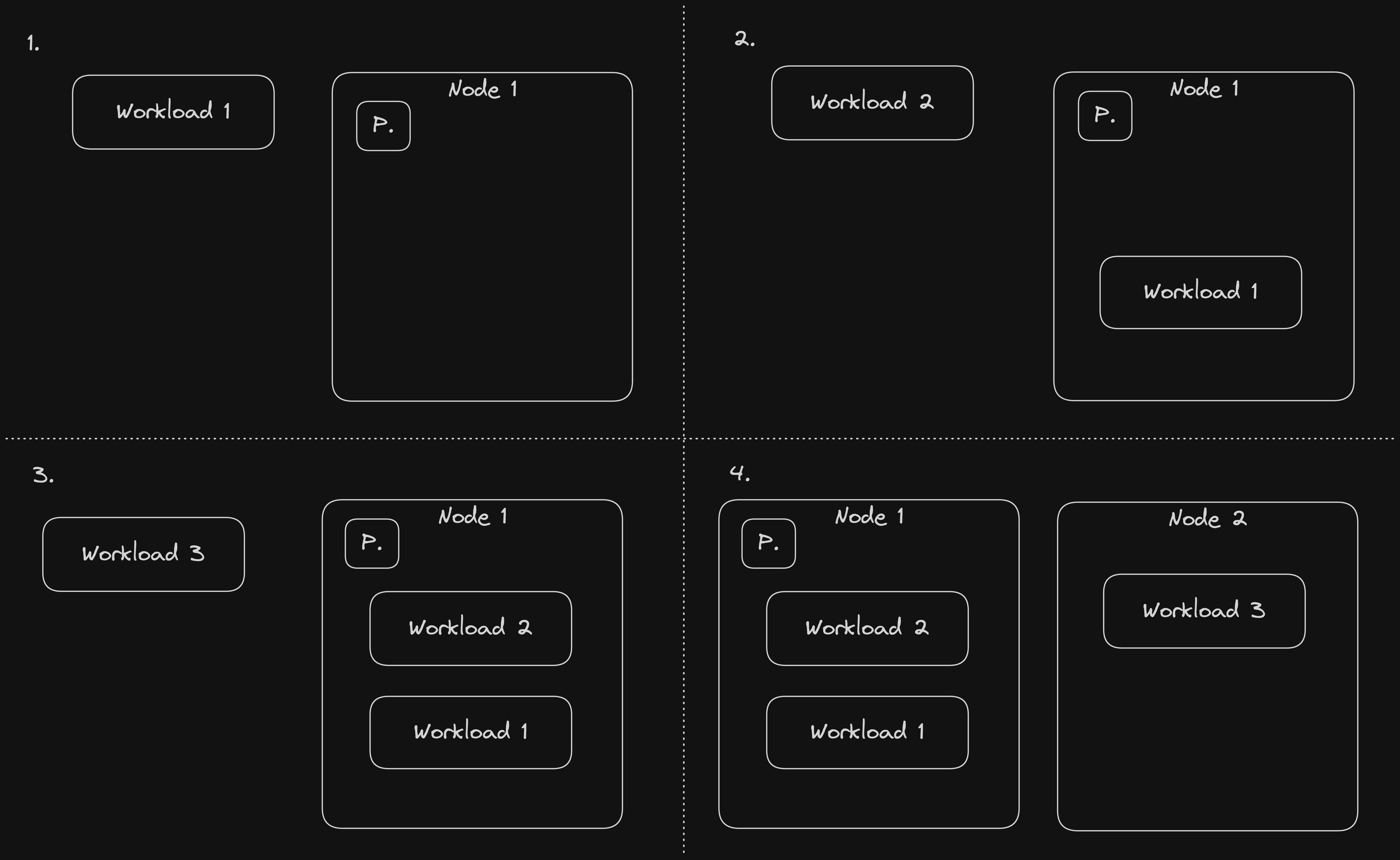
Reservation placeholders should have minimal resources, so they don't take up much space on the node. To ensure a larger node is provisioned despite the small resources, known labels, such as node.kubernetes.io/instance-type can be used in the reservation placeholder pod nodeSelector. To ensure that each node has at most one placeholder, antiAffinity should be set on the placeholders to push them away from each other.
Reservation placeholders are best suited for situations when the size and timing of the expected workload capacity is known. Let's say you are launching a new feature for your app on Monday at 15:00, and your projections based on marketing/sales metrics show that 200,000 users are expected. Based on the figure and previous usage metrics you calculate how much capacity is needed for the actual workload, and some time (minutes, hours) before the the feature drops, you spawn a few reservation placeholders to launch all the necessary nodes. Other examples: merch drops, video game/TV show/movie releases.
Overprovisioning
An overprovisioning placeholder is a dummy pod with low priority and configured resource requests (CPU, memory). Its low priority ensures that if a higher priority workload is scheduled onto the node, and there isn't enough capacity next to the overprovisioning placeholder, the placeholder is evicted in favour of the new workload. The overprovisioning placeholder is then scheduled onto another node which has enough capacity, or if no node is available, the autoscaler creates an extra one for it. Once the real workload no longer occupies the former node, overprovisioning placeholders can be consolidated back onto thenode. Low priority is configured by creating a priority class with a low priority, and setting its name in the priorityClassName of the pod.

The size of overprovisioning placeholder pods usually mimics the requirements of real workload pods. Unlike reservation placeholders, overprovisioning placeholders are not tied to a specific node, but can be freely moved around, and multiple overprovisioning placeholders can end up on the same node at the same time. The exact node type selection is left to the autoscaler based on the sizing criteria, but of course, nodeSelector and affinity can be configured for the overprovisioning placeholders if necessary.
Overprovisioning placeholders are best employed in situations in which the total size or timing of the workload is not known, but all new workloads should be provisioned similarly quickly, e.g. when provisioning pods per user.
Imagine this; your application provides on-demand sandboxes where your customers run arbitrary code - they therefore have to be isolated in separate pods. Each customer starts their sandbox by clicking a button on the website, and expects the sandbox to be online almost immediately. It is impossible to know the exact time when a customer requests a sandbox. Overprovisioning placeholders ensure that each next customer gets their sandbox in a similar time by being evicted and causing the creation of a new node, onto which the next sandbox can later be placed.
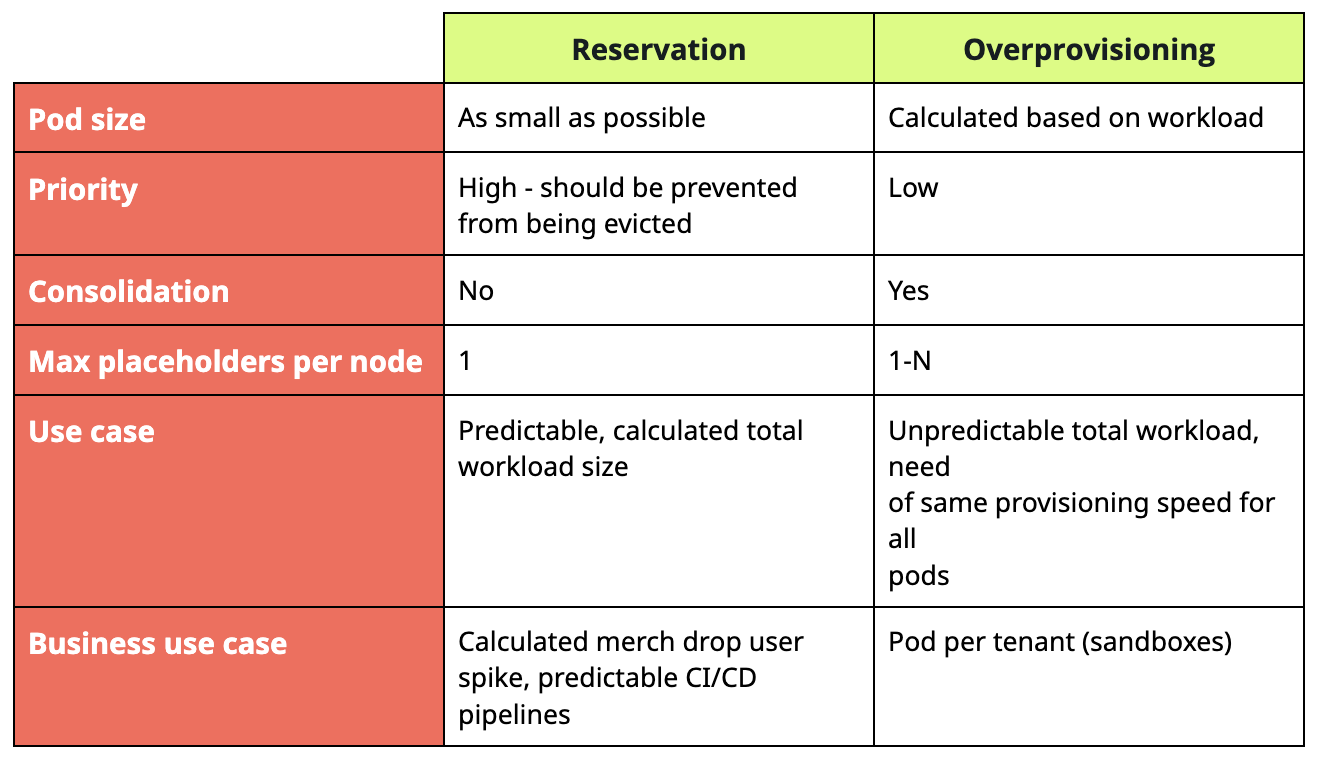
Reservation and overprovisioning table summary
Here's a small table comparing reservation and overprovisioning:
Giving placeholders something to do
Placeholder pods don't just need to sit there and hold up space for something more important. They can be used for other purposes as well:
- Pre-pulling of images [another potential bottleneck]
- Do actual work [e. g. processing messages]
A fine balance
Placeholders aren't magic; they do have their limitations.
Reservation placeholders hold a capacity up to an upper limit. Anything above gets spawned from zero - in our example of 200,000 users, user 200,001 will likely have a bad time.
Overprovisioning placeholders can't cover off sudden spikes that well - if the rate of new arriving workload is greater than the rate at which overprovisioning placeholders are able to spawn new nodes, a portion of the users are going to get impacted by a slow start.
And of course, there's the matter of cost - placeholders provision capacity that you have to pay for.
Therefore, to use placeholders effectively, it is important to consider the following factors:
1. The size of the workload that should start quickly - based on historical data, research and preparation.
2. The tolerance of users to slow starts - the lower the tolerance, the more placeholders you need.
3. Cost - can I afford the above?
Tools
Despite the concept of placeholders not being new, not many out-of-the-box open source tools can be found:
- https://github.com/codecentric/cluster-overprovisioner
- https://github.com/deliveryhero/helm-charts/tree/master/stable/cluster-overprovisioner
At LabLabs, we have decided to try our own take on the reservation and overprovisioning concept with Keeper https://github.com/lablabs/keeper, which allows you to configure reservation and overprovisioning placeholders with an optional schedule (you might want placeholders only during working hours). Feel free to check it out!
Keeper
Keeper (at the time of writing this blog) uses a simple setup of deployments and cronjobs. Deployments provision reservation or overprovisioning placeholders. The configuration allows multiple reservation and overprovisioning placeholders to be configured. By default, dummy pause container images are used.
Reservation placeholders have pre-configured affinity to allow only one reservation placeholder on each node. To ensure overprovisioning placeholders get evicted by higher priority workloads, the Keeper chart creates a priority class with low priority.
Cronjobs can be configured next to the deployments, and serve to modify the deployment replicas according to a schedule, for example, to only create placeholders during the day and downscale them for the night to save costs.
Using deployments and cronjobs allows Keeper to be installed on any Kubernetes cluster without requiring other external components. KEDA and cron scaling serve a similar use-case https://keda.sh/docs/2.19/scalers/cron/, and may be implemented into the Keeper chart as an alternative to the cronjob setup.
Let's go over a few Keeper configuration examples:
- I need 5 c5d.xlarge instances ready for a spike in usage. The ideal solution is to create 5 reservation placeholders.
reservation:
  placeholders:
    default:
      replicas: 5
      nodeSelector: |
        node.kubernetes.io/instance-type: c5d.xlarge
- I am expecting a spike in usage every Monday at 15:00 due to a regular merch drop. I expect I won't need more than 20 r7i.2xlarge nodes. The nodes need 5 minutes tostart due to a configuration script. The spike is expected to last 1 hour.
reservation:
  placeholders:
    default:
      nodeSelector: |
        node.kubernetes.io/instance-type: r7i.2xlarge
      schedule:
        up:
          replicas: 20
          cron: "50 14 * * 1" # Pre-provision nodes a bit earlier
        down:
          replicas: 0
          cron: "0 16 * * 1"
- Each of my primary workload pods requires 1Gi of memory, I am expecting that at most 10 potential users will request new pods at the same time. I also have a secondary workload requiring 2 CPU cores, and I expect 15 users to request new pods from 10:00 to 16:00 at the same time. The rest of the time, I expect only new 5 users.
overprovisioning:
  placeholders:
    default:
      replicas: 10
      memory: "1Gi"
    foo:
      cpu: 2
      schedule:
        up:
          replicas: 15
          cron: "59 09 * * *" # Pre-provision nodes a bit earlier
        down:
          replicas: 5
          cron: "0 16 * * *"
Links
- https://github.com/lablabs/keeper
- https://github.com/codecentric/cluster-overprovisioner
- https://github.com/deliveryhero/helm-charts/tree/master/stable/cluster-overprovisioner
- https://kubernetes.io/docs/tasks/administer-cluster/node-overprovisioning/
- https://medium.com/@derek10cloud/kubernetes-as-a-subway-overprovisioning-priority-and-preemption-518656730d05

![[Part 1] Karpenter: Kubernetes Autoscaling with Performance and Efficiency](https://cdn.prod.website-files.com/66ba18ab4a29ff8fa3193c1a/6705223aacee2f2eba31eae5_Karpenter%201.avif)
![[Part 2] Karpenter: An Opportunity to Reduce your Cloud Bill](https://cdn.prod.website-files.com/66ba18ab4a29ff8fa3193c1a/6705244762aba5c89547d094_Karpenter%202.avif)